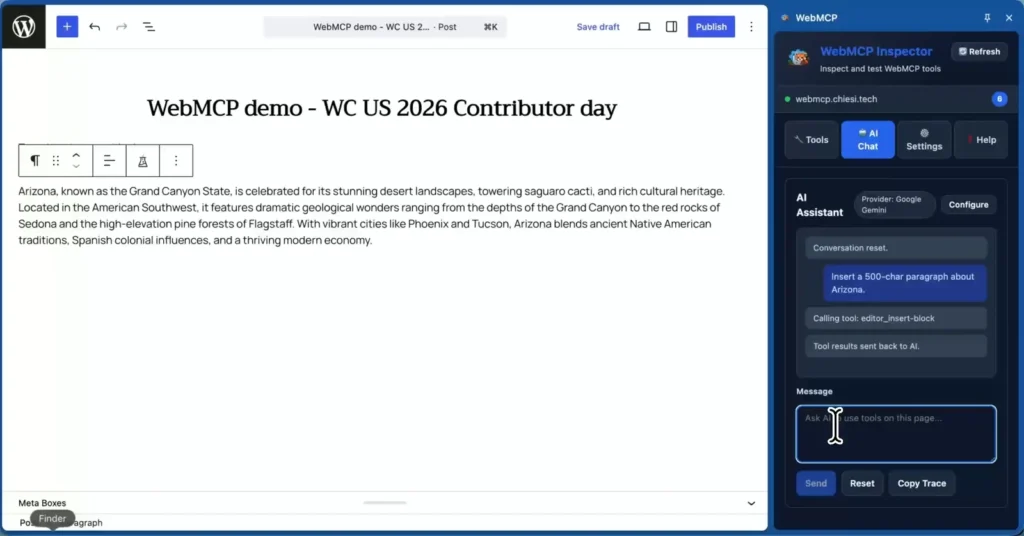
WordCamp US ran its Contributor Day as a hackathon this year, so instead of a table of triage I spent the day on the WebMCP project. We built a WordPress plugin that exposes block editor actions as WebMCP tools, which lets an AI agent edit a post while you watch — in the browser, in real time, with no page reload and no server in the middle.
Contributor Day is usually organised by team: core, docs, polyglots, accessibility, each with a table and a queue of tickets. Phoenix tried something different — projects you join for the day and demo at the end. It suits exploratory work far better than a ticket queue does, and it is how I ended up spending eight hours on a browser standard I had only read about.
MCP and WebMCP are not the same thing
The names are close enough to cause real confusion, so it is worth separating them before anything else.
- MCP — the Model Context Protocol — is the open standard for connecting AI agents to tools and data over a network. A server exposes tools; a client such as Claude Code or Cursor calls them. It is infrastructure-level plumbing between an agent and a backend.
- WebMCP is an emerging browser-native standard, and despite the name it solves a different problem. A page declares its own tools in JavaScript, in its own client-side context, and a WebMCP-capable browser surfaces them to an agent. No MCP server, no network hop, no backend involved.
Put bluntly: MCP connects an agent to your backend; WebMCP connects an agent to the page you are looking at right now. That difference matters for a CMS, because an enormous amount of what WordPress does only exists in the browser — unsaved editor state, selection, the block tree as it currently stands. A server-side API cannot see any of it.
Support is early. Chrome does not implement WebMCP natively yet; you need an extension and a little setup to try it. Native support should follow as the standard settles, which is exactly why it is worth building against now.
What we built
We started out aiming at WP Admin generally, then narrowed to the block editor after the first hour of discussion. That was the right call: the editor is where the interesting client-side state lives, and it is the screen where a user would actually want to say “add a two-column section here” rather than do it by hand.
Recent WordPress releases ship a client-side abilities mechanism, which lets JavaScript declare named capabilities that can be discovered and invoked inside the editor. Core provides the machinery and, deliberately, no abilities at all. It is a blank canvas.
So we filled some of it in. The plugin does three things:
- Registers nine editor abilities on top of the core mechanism — read the block tree, find blocks by text or attribute, get the current selection, insert, move, update and remove blocks, and ask whether a block type can be inserted at all.
- Bridges them to WebMCP: each registered ability is surfaced as a tool through
document.modelContext.registerTool(), so any agent in a WebMCP-capable browser can discover and call it. - Gets out of the way. There is no bundler; the files are native ES modules resolved through WordPress import maps, and the whole thing runs in Playground for anyone who wants to try it without a site.
The result is the part that is hard to convey in text: you open a chat panel next to the editor, ask for something in plain language, and the post changes in front of you. The agent calls editor_insert-block, a paragraph appears. No refresh, no save, no round trip.
The unglamorous part is the interesting part
Most of the day did not go into the happy path. It went into the rules that stop an agent from quietly corrupting a post, and those turned out to be the substance of the project.
- An unknown block ID is an error, never a silent no-op — a stale reference fails loudly instead of inserting the content somewhere else.
- Attribute changes are merged, not replaced, and keys the block type does not define are rejected with the list of ones it accepts.
- Container blocks have to be built whole: an empty
core/columnsrefuses children, so a two-column layout must arrive as one block holding two columns. - Attribute values are checked against the shape the block declares, including the defaults WordPress normally only fills in when parsing saved markup — miss those and a table cell renders an undefined element and breaks the block.
None of that is glamorous, and all of it is the difference between a demo and a tool. An agent will do exactly what the API lets it do, so the API has to be the one holding the line.
The team
Five of us, for one day: Helen Hou-Sandi, Joe McGill, Micah Wood, Andy Peatling and me. Being the least expert person on a table is the fastest way to learn a new part of the platform, and I would recommend it.
Where it lives
- The plugin on GitHub — nine abilities, the WebMCP bridge, and a README that documents the behaviour of each tool.
- The Contributor Day closing slides — our project is slide 49.
It is a day-old prototype built against a standard that no browser ships yet, so treat it as a sketch rather than something to install on a client site. But the shape of it feels right. If agents are going to work inside WordPress rather than around it, they need to reach the live editor — and this is the first time I have seen that work.