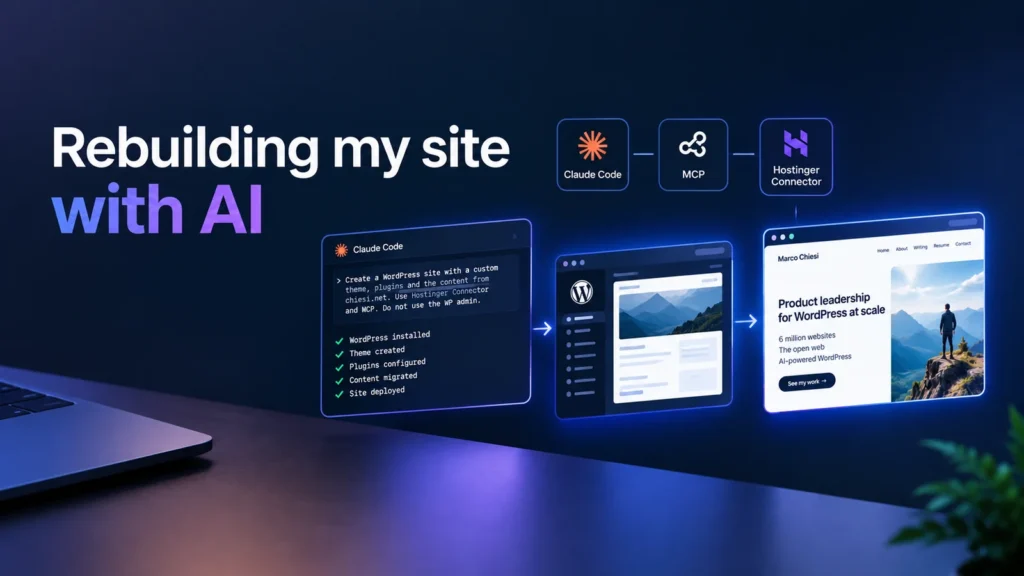
I have been building websites since 1998 and WordPress sites since 2010, and shipping plugins for nearly as long. I rebuilt this one without writing a single line of code, without opening the WordPress admin, and without opening the hosting control panel either. I talked to an agent, and it did all of it.
That is the whole claim, so it is worth being exact about it. I did not write or edit any code by hand. I did not visit wp-admin — not to install WordPress, not to create a page, not to check a setting. I never opened the hosting control panel either. I did not touch FTP, a file manager or a database. Every file, every page, every post, every setting, and the WordPress installation itself, was created by an agent I was describing things to in plain English.
It was a weekend project, and not a full-time one — a couple of sessions, a few hours in total. It was also not a stunt. I wanted to find out something specific: whether an AI agent can operate a WordPress site end to end — provision it, install it, build for it, fix it — rather than just generate code for a human to paste somewhere.
This is the result. The site you are reading was built that way, which is the only reason I think the story is worth telling.
The rules
I set the constraints before I started, because a rule you can quietly drop is not a rule:
- No WordPress admin.
- No hosting control panel.
- No FTP or SFTP.
- No code written or edited by hand.
- No manual WordPress install, theme upload or plugin upload.
- Everything through an AI coding agent, in natural language.
One more, which turned out to matter more than the rest: the agent got no access to the old site. No admin account, no database, no export file, no theme files. That was deliberate. It is the situation you are actually in when you rebuild a site — the credentials belong to someone else, or the old stack is a black box, or you simply do not want to inherit ten years of accumulated decisions. So it had to work the way a human agency would: read the public pages, and rebuild from what is visible.
And to be clear about what is and is not impressive here: an AI writing PHP is not news. The question was whether I could go from “I want a new site” to a running WordPress installation while treating the agent as the interface to the whole stack — servers, WordPress, content and all.
The stack that made it possible
This is the part I would most like other people to copy, so it is worth being precise about the plumbing. There are four distinct pieces, and only one of them is the agent.
- The agent. Claude Code, running in the Claude desktop app, on Claude Opus 5 at its high reasoning setting. Not a terminal, and not a coding assistant inside an editor — a chat window that happened to have hands. It could equally have been Cursor or any other MCP client; nothing here is specific to one of them, though the model choice did matter. Most of what follows is long-horizon work where the failure mode is losing the thread, not writing a bad line of CSS.
- The Hostinger Connector. An extension for MCP clients that sets up the connections in one click — no config files, no tokens pasted into JSON. Crucially it wires up both of the services below, which is what makes this a single environment rather than two integrations.
- Hostinger MCP. The MCP service for the hosting account itself, sitting on the Hostinger API: inspect a plan, create a website, install WordPress, push theme and plugin files, toggle plugins, read DNS, purge caches. Everything you would normally click through in a control panel, and it runs outside the site.
- The WordPress MCP. An MCP endpoint served by the Hostinger AI plugin on the install itself, authenticated with a short-lived token issued by the hosting layer. Posts, pages, categories, tags, media, users, options, custom post types, revisions — everything you would normally click through in wp-admin, and it runs inside the site.
One service owns the hosting; the other owns the CMS. Both are Hostinger infrastructure, reached through one connector, from one chat window — and between them there is very little left that genuinely requires a browser.
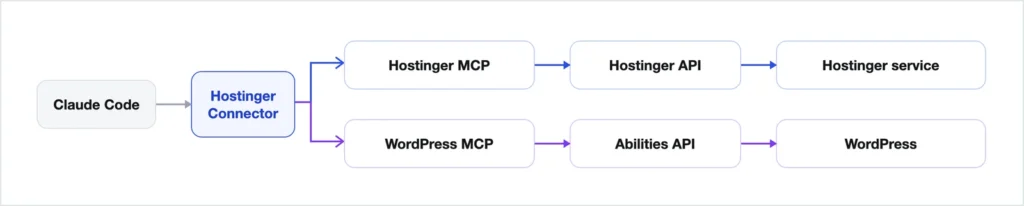
Who provides what deserves its own paragraph, because it is easy to get backwards. The foundation is WordPress core’s, and it is more than a foundation: the Abilities API, which gives plugins one standard way to declare what a site can do in a form a machine can discover and call, and the MCP adapter that exposes those abilities as an MCP server. That infrastructure ships with WordPress. What the Hostinger AI plugin mainly contributes on top is the abilities themselves — the set of things this particular site can be asked to do — plus the authentication that lets an outside client in. The connector and the hosting service on the other path are Hostinger’s.
The site exposed 76 abilities during this build, and the plugin can expose up to around 130, depending on which plugins are installed — this site simply does not use the ones that would have added the rest.
The split in the call counts is itself informative. The hosting service took 157 calls, most of them file deploys, and the WordPress side 122. The hosting side dominated early — you cannot edit a post on a site that does not exist yet — and the WordPress side caught up over the second day, as the work moved from building the thing to correcting it. Even so the WordPress count stayed lower than you might expect, because bulk content was better handled by code the agent deployed and ran on the server than by hundreds of individual calls. The WordPress MCP was used for the things that genuinely are one-offs: site settings, the front page, a category, checking what the media library actually contained.
Starting from nothing
The first instruction was, roughly: create a new WordPress site on my plan, on chiesi.tech, and take the content from chiesi.net.
What happened next was the part that actually surprised me. The agent listed my hosting orders, worked out which plan already hosted my other chiesi.tech subdomains, checked that the apex domain had no site on it yet, created the website, installed WordPress, and then — because it needed a way in — requested a token for the install and opened an MCP session against it.
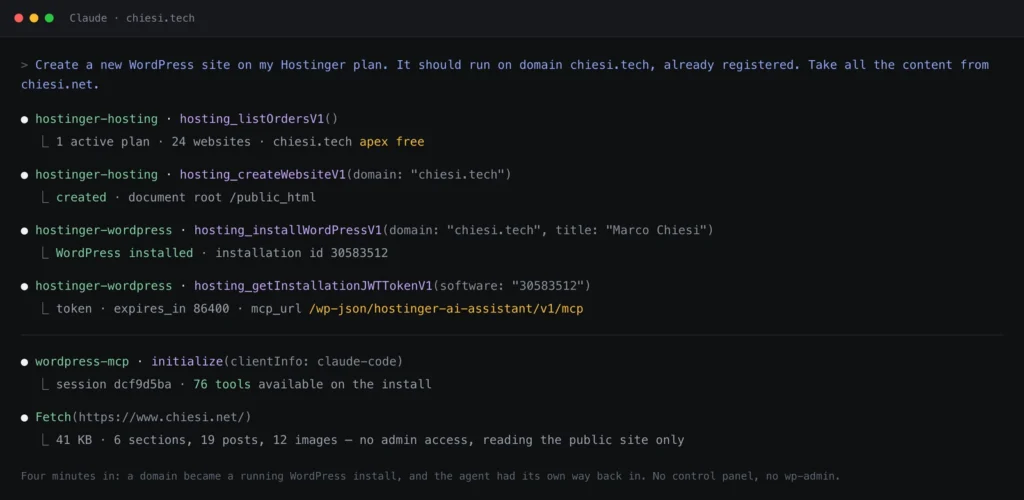
Then it went and read chiesi.net over HTTP, like any other visitor, and started porting the content across. I watched all of that happen. I did not do any of it.
What it decided to build
I never specified an architecture. I asked for a modern, minimal site on WordPress and Gutenberg with no page builder, and said everything had to stay editable in the admin. Every structural decision below was the agent’s, proposed before it was built:
- A block theme — 21 files: ten templates, two template parts, a
theme.jsonand about 1,200 lines of CSS. Four custom blocks came with it: the colour-mode toggle, the monogram, the category pills and the rotating headline, each server-rendered with an editor preview and no build step. - A light/dark system built on 17 design tokens, wired so that
theme.jsonpoints at CSS custom properties rather than hex values. Eleven of them are redefined for dark mode; one override flips the whole palette, in the front end and inside the editor. - A separate plugin for the content — roughly 2,600 lines of PHP: three custom post types for roles, education and certifications, fifteen meta fields with classic meta boxes, and three server-rendered blocks that lay them out. The theme owns design, the plugin owns content.
- Meta descriptions and JSON-LD, because I had ruled out installing an SEO plugin — including the part where it stands down automatically if Yoast, Rank Math or SEOPress ever appears.
- An idempotent seeder: every content import is a batch keyed by an option, so re-running the plugin never duplicates or overwrites what I have since edited by hand.
The plugin split is the decision I would defend hardest, and I am glad I did not have to suggest it. My CV is structured data: roles, employers, dates, qualifications. If that lives in the theme, it dies with the theme. Change the theme in five years and the CV is still there.
The visible result is that every word on this site is editable in the WordPress admin — the irony being that I built it without going there. The point was never to lock myself out. It was to see whether the agent could do the building.
One more result worth recording, because I did not ask for it and no optimisation pass went into getting it. Out of the box — no caching plugin, no critical-CSS step, no image pipeline beyond what WordPress does itself — Google PageSpeed Insights scored the site 98/100 on mobile and 100/100 on desktop for performance, and 100/100 for accessibility, best practices and SEO on both. A hand-built block theme with two stylesheets, two font files and 221 lines of JavaScript turns out to be hard to beat; most of what makes WordPress sites slow is what gets added afterwards.
It did take a deliberate pass later to hold that. Adding real photography dropped mobile performance to 90 before WebP conversion, correct sizeSlug values and accurate sizes hints brought it back. Where it finished: 100 across the board on desktop, and 99 for performance with 100 for accessibility, best practices and SEO on mobile.
What it cost
I can be exact about this, because the whole build is one session transcript, from the empty domain to the finished site. The counts below were taken the last time I revised this article, which of course moved them slightly. My share:
- 42 written instructions and 13 screenshots — everything I typed, from the empty domain to the last correction on this page. About 3,400 words of actual direction, including every round of “this is wrong, change it”. On top of that I pasted in roughly 7,100 words of source material: a brief for this article, a dump of my own career history, notes for two other write-ups.
- One weekend — Saturday and Sunday — but not a full-time one. I was doing other things in between, and most of my contribution was reading what had been built and saying what was wrong with it.
- No hands on the code, the server or the admin at any point.
Forty-two. I did not plan that, and I have decided not to treat it as a coincidence. In The Hitchhiker’s Guide to the Galaxy, Douglas Adams has a computer the size of a city think for seven and a half million years and return 42 as the answer to life, the universe and everything. Mine took a weekend and produced a website, which is a less impressive result for the same number.
The agent’s share:
- 1,522 tool calls in total, of which 284 were MCP calls to Hostinger — 157 to the hosting service, 127 to the WordPress side — and the rest local work: reading and writing files, searching, fetching sources, driving a headless browser.
- 7 hours and 32 minutes of actual working time, counting only the gaps of five minutes or less between its own actions rather than the 39 hours of wall clock those actions are spread across.
- 93 deploys of the theme and plugin, 381 fetches of the live site to check the result, and 56 headless-browser renders to measure or look at what had landed.
That last group is the honest summary of the workflow. Close to four verification fetches for every single deploy. Most of the agent’s time did not go into writing the site; it went into looking at what it had just shipped — and a good share of the defects in this article were found that way rather than by me.
Most of that was not the build
Those totals flatter the difficulty, and I would rather say so. The site was finished long before they were reached.
By the end of the Saturday I had given ten instructions and the agent had made about 530 tool calls. At that point the thing was done: domain, WordPress, a theme, a plugin, the whole back catalogue, light and dark, a perfect Lighthouse run. Not a prototype — finished, and way better than the site it replaced. Better, honestly, than anything I would have built myself in ten times the hours. By fifteen prompts and 750 calls it was finished and had a first draft of this article about being finished.
Everything after that — roughly 750 more calls, more than half the total — is me. Not fixing a broken build: adding. A resume page, then a merged About page, then better images, then responsive images, then a different typeface, then a lightbox, then two more articles, then a favicon. Each one a perfectly reasonable idea, none of them necessary, all of them mine.
That is the part I did not expect and think is worth naming. When the cost of asking for one more thing collapses to a sentence, the limit on scope stops being effort and becomes taste — and taste is a much weaker brake than a day of work used to be. The agent never once said “that is enough now”. Neither did I, for about thirty prompts.
Nine years of scattered work, in one place
There is a second reason I wanted this done, and it has nothing to do with AI. For years I had given talks, joined hackathons and done interviews, and every one of them lived somewhere else: a WordCamp site, someone’s YouTube channel, WordPress TV, a hackathon project page, another company’s blog. Some of those hosts will not outlive the decade. I had been meaning to collect it all on my own site since roughly 2018, and I had never found a weekend for it.
This is the work that would have taken me the weekend I never had:
- 14 posts assembled from 25 different external sources, spanning 2017 to 2026 — the whole archive. Three more have been written here since, so the blog now runs to seventeen.
- Seven WordCamp talks — most of them delivered in Italian — written up in English with the original titles kept, dates recovered from the WordCamp sites, session videos embedded from WordPress TV and YouTube, and slides linked where they still exist.
- Five interviews, transcribed and credited back to the publications that ran them.
- Two CloudFest Hackathon projects, written as articles rather than copied.
- Twenty-seven images found, imported and attributed — including the featured images for talks that never had one.
None of that is clever. It is exactly the kind of patient, exacting, unglamorous work that never reaches the top of anybody’s list, and it is the single biggest thing I got out of this experiment. My CV is now the summary; the site is the record.
Who wrote this post
The agent did. I should say that plainly rather than bury it in a footnote.
I asked for an article about the rebuild, gave it the angle and a list of things I thought mattered, and it wrote this from its own build record — which is also why the numbers above are exact rather than rounded. I then did to it what I did to everything else on the site: read it, told it what was wrong, and had it fixed. An early draft included a failure that had not happened the way it remembered, a claim about my own behaviour that was not true, and an architecture description that flattened four distinct pieces into two. All three are gone.
So: the words are the agent’s, the corrections and the judgement calls are mine, and the byline stays mine because I am the one accountable for what is on this page. I think that is the honest description of most writing that will be published for the next few years, and I would rather state it than pretend.
Where it broke
If this article made it sound like the agent got everything right, you should not believe the rest of it. Here is what actually went wrong, because the failures are more instructive than the successes.
The migration nobody was ever going to trigger. The plugin’s content seeder was hooked on admin_init — the sensible default, and completely wrong here, because no one was going to open the admin. It sat there doing nothing until the agent worked out why the site was empty and moved it to init with a lock and an explicit post author. An agent-operated site has no “someone will log in eventually” to lean on.
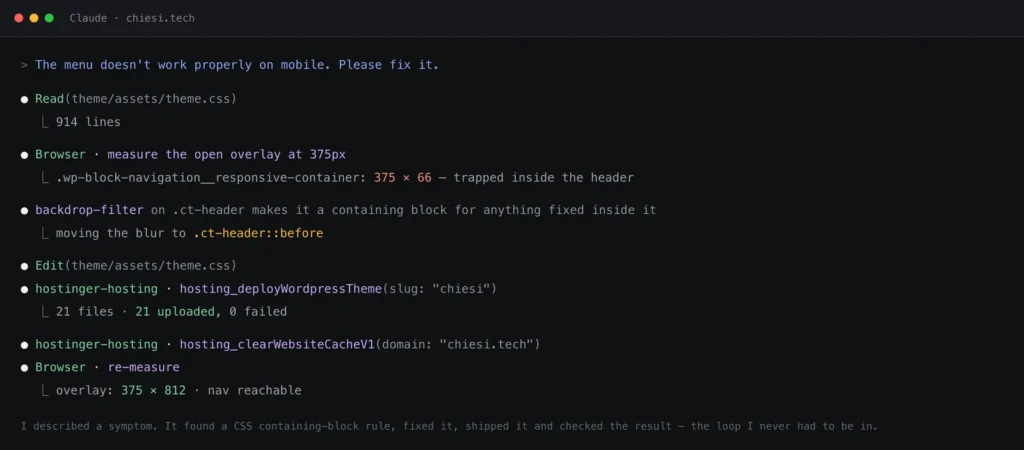
The sticky header would not stick. Two separate causes, both invisible until you look: the header was wrapped in a container that hugged it exactly, so a sticky element inside had no range to travel; and backdrop-filter — the frosted-glass effect — makes an element a containing block for anything positioned fixed inside it. That second one was also silently breaking the mobile menu, trapping a full-screen overlay inside a 66-pixel-tall header.
A block rendered empty with no error anywhere. The animated headline on the homepage kept coming out blank. The cause: a real newline inside the JSON attributes of a Gutenberg block comment. Block comments have to be one line, so WordPress silently dropped the attributes and rendered the block with its defaults. No warning, no log entry, nothing in the markup to see. It came back weeks later in a different disguise — wp_insert_post() expects slashed input, so the escape sequence separating the three phrases lost its backslash on the way into the database and all three rendered as one string.
Markup the front end rendered perfectly and the editor rejected. Hand-authored block markup has to match exactly what the block’s own save() would produce. A custom class in the wrong place on an image, a missing alignment class on a columns block — the site looked fine, and the editor would have said “this block contains unexpected content”. That class of breakage is invisible from the front end, which is precisely where we were both looking.
Images that loaded correctly and could not be seen. It will happily report that a featured image imported at the right dimensions. Whether it is dark artwork on a dark background is a judgement it did not make until I made it.
And a cache made everything look broken. More than once a change was live on disk and stale in the page cache, which sends you debugging code that is already correct.
None of these were fixed by me opening DevTools. They were fixed by describing the symptom — “the header doesn’t stick”, “the mobile menu is broken”, “this block is empty” — and letting the agent go and find the cause. Which it did, including the two I would have had to think about for a while myself.
Security, and the fact that I had to ask
Right at the end, with the site finished and this article already published, I asked for something I had not asked for once in forty-two prompts: an audit of the code the agent had written for me.
It found two things. The structured-data block was being encoded with a flag that switches off PHP’s default escaping of forward slashes — the thing that normally stops a value containing </script> from closing the tag early and turning the rest into markup. And none of the plugin’s files carried the one-line guard that stops a PHP file being executed directly over HTTP; every one of them was reachable. Neither is dramatic. The first needs an account already permitted to post raw HTML, and the second leaked nothing because this server has error output switched off. Both are also the kind of thing a WordPress.org plugin review rejects on sight, and both took a minute to fix.
What the audit did not find is the more interesting half. Every piece of output was escaped. Every write checked a nonce and a capability. The single raw SQL query was a prepared statement. No new endpoints, no file writes, nothing touching users or roles. The code was not careless — it was careful everywhere I would have thought to look, and slightly wrong in two places I would not have.
But I had to ask. In forty-two prompts the agent never once said “shall I check this is safe?”, and neither did I. Everything else it did well, it did because I described a symptom: the header does not stick, the menu is unreadable, this block is empty. Security is not a symptom. Nothing looks wrong, and nothing will, right up until it does. If there is one operational lesson in this piece, that is it — the audit is a prompt you have to remember to write.
What the workflow is genuinely good at
- Infrastructure. Provisioning, installing, deploying, activating, purging. Repetitive, well-documented, API-shaped work, and a better fit for an agent than for a human with a mouse.
- Consistency across a codebase. A design token added once propagated everywhere it should, in both colour modes, without anybody grepping for stragglers.
- Diagnosis from a symptom. Given “the mobile menu is broken”, it found the
backdrop-filtercontaining-block rule. That is not code generation, it is debugging. - Tedious, exacting content work. Fourteen posts, twenty-five sources, twenty-seven images. This is the part I could not have bought with a weekend.
What it is not good at
- Knowing when something looks wrong. Dimensions are measurable; “invisible on a dark background” is not, until someone says so.
- Taste, and my own positioning. The first pass at my homepage copy described a developer. I am a product manager now. No amount of prompting quality fixes the fact that only I know that.
- Caching and other invisible state. An agent reasons about the code it can see. A CDN or page cache is neither, and it will confidently debug the wrong layer.
- Asking the question you forgot. It will answer “is this secure?” properly and at length. It will not raise it on your behalf.
- Knowing what is worth building. Which is, conveniently, most of my actual job.
What I think this actually means
The conclusion I want to resist is “AI makes building websites easier”. That is true, boring, and was true last year.
The more interesting shift is about where the interface lives. The traditional path runs human → control panel → wp-admin → settings → site. Every step assumes a person clicking. What I did instead was human → agent → abilities → site, and the CMS stayed exactly where it should be: as the system of record, with a perfectly good admin for whoever wants it.
That is not an argument for removing wp-admin. Every piece of this site is still editable there, deliberately, and most of the time that is the right tool. It is an argument that the dashboard no longer has to be the only way in — and that a CMS which can describe its own capabilities is worth a great deal more in a world of agents than one that cannot.
WordPress is unusually well placed for that. It has had the REST API for years, WP-CLI for longer, and now an Abilities API in core for plugins to declare what they can do. That is a real structural advantage, and I do not think the ecosystem has fully noticed yet.
For anyone who wants to reproduce it
Which piece of the stack did what, in the order it happened:
| Operation | Where it ran |
|---|---|
| Connect the agent to both services | Hostinger Connector — one click, no config |
| Inspect plan, orders and domains | Hostinger MCP |
| Create the website on the apex domain | Hostinger MCP |
| Install WordPress | Hostinger MCP |
| Issue a token for the install | Hostinger MCP |
| Open an authenticated session on the site | WordPress MCP — Hostinger AI plugin |
| Discover what the site can do | Abilities exposed by the plugin, on the core Abilities API |
| Read the old site | Plain HTTP — no credentials |
| Author the theme and plugin | The agent, locally |
| Deploy theme and plugin files | Hostinger MCP |
| Activate plugins, purge caches | Hostinger MCP |
| Front page, settings, categories, media checks | WordPress MCP |
| Bulk content and media import | Migrations in the custom plugin |
| Verify rendering, light/dark, mobile | HTTP fetches + a headless browser |
The one thing I would tell anyone trying this: the agent needs a way to check its own work. Most of the time we lost went to changes that were correct on disk and invisible in the browser. Give it a cache-busting fetch and a way to measure the rendered page, and the loop tightens dramatically. Three checks per deploy is not overhead; it is the reason the thing works at all.
Disclosure
I work at Hostinger and I lead the WordPress products, including some of the tooling used here. This was a personal project — my own site, my own time, my own scope creep — but it is also precisely what that tooling is for. The reason we put MCP in front of hosting and WordPress is so that someone can sit down with an agent and get real work done on their own site, and everything I used here is available to anyone on the same plan. So read it as a worked example from the customer side, written by someone who knows where the edges are.
A worked example is not a recipe. The order I did things in was improvised, several pieces took three attempts, and a different agent on a different day would make different choices — which is the interesting part rather than a caveat. I wrote it up, and had it written up, because the result genuinely surprised me, and because what matters here is the interaction model more than any one tool.
The site you are reading is the artefact. If something on it looks off, that is part of the report.